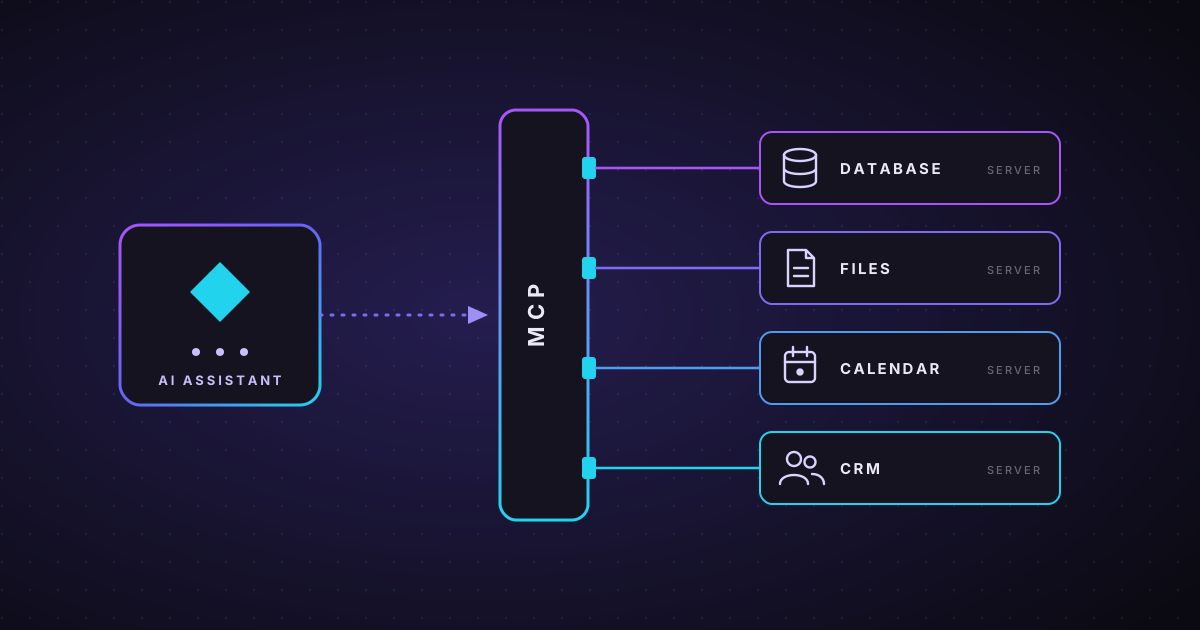
An AI assistant is only as useful as the information it can reach. A chatbot that can't see your orders, your documents or your calendar can only give general answers. For a long time, connecting AI to business systems meant writing a custom integration for every pairing of model and tool.
The Model Context Protocol (MCP) changes that. It's an open standard that gives AI applications one common way to connect to tools and data, and it has become one of the most important building blocks of practical AI in the last year.
What is MCP?
MCP is a shared set of rules for how an AI application talks to outside systems. A helpful way to picture it is a USB-C port for AI: instead of a different cable for every device, there's one standard connector that everything understands.
With MCP:
- a tool or data source is wrapped once as an MCP server;
- any AI application that supports MCP (the client) can then connect to it;
- the AI can discover what the server offers and use it, within the permissions you grant.
Build the connector once and it works with many AI assistants, rather than rebuilding it for each one.
Where it came from, and where it is now
- November 2024: Anthropic introduced MCP as an open protocol.
- 2025: other major AI providers and developer tools added support, including products from OpenAI, Google and Microsoft. An official registry for finding MCP servers followed.
- December 2025: Anthropic donated MCP to the Agentic AI Foundation, a fund under the Linux Foundation co-founded by Anthropic, Block and OpenAI. MCP is now governed as a neutral, community-run standard rather than belonging to one company.
That last step matters for businesses: building on an open, vendor-neutral standard means you're less likely to be locked into a single AI provider.
What can an MCP server provide?
An MCP server can offer an AI application three kinds of things:
| Type | What it is | Example |
|---|---|---|
| Tools | Actions the AI can take | Create a support ticket, look up an order, send a draft email |
| Resources | Information the AI can read | A product catalogue, policy documents, a customer record |
| Prompts | Ready-made instructions for common tasks | "Summarise this week's sales", "Draft a reply to this complaint" |
The AI application decides when to use them, and the person or the system's rules decide what it's allowed to use.
Why it matters for businesses
Less integration work. One MCP server for your CRM can serve every MCP-compatible assistant your team uses, instead of separate integrations for each.
Freedom to switch models. Because the connection is standard, you can move to a newer or cheaper AI model without rebuilding how it reaches your data.
Better answers. An assistant that can read your real documents and records gives specific, up-to-date answers instead of guesses. This works hand in hand with retrieval: see what it takes to run RAG in production.
A foundation for agents. AI agents need tools to act. MCP gives them a consistent way to reach those tools, which makes well-designed agent loops much easier to build.
The risks to plan for
Connecting AI to real systems is powerful, and that's exactly why it needs care.
- Least privilege. Give each MCP server only the access it needs. A server for reading invoices shouldn't be able to delete them.
- Approval for risky actions. Reading data can usually happen freely; sending money, deleting records or emailing customers should need a person's approval. We cover how to draw that line in designing AI agents with a human in the loop.
- Trust your sources. Only install MCP servers from publishers you trust, and review what each one can do. A malicious or careless server is a security risk like any other software.
- Watch for prompt injection. Text inside a document or web page can try to trick an AI into misusing its tools. Keep sensitive actions behind approvals and validation, not just instructions to the model.
- Keep a record. Log which tools were called, with what inputs and results, so every action can be reviewed later.
How to get started
- Pick one valuable, low-risk use case, such as letting an assistant answer questions from your internal documents.
- Check what already exists. Many popular tools already have MCP servers you can evaluate.
- Start read-only. Let the AI look things up before you let it change anything.
- Add actions gradually, each with clear permissions, approvals where needed and logging.
- Measure the result: time saved, answer quality and errors caught.
MCP turns "AI that talks" into "AI that can work with your systems", on an open standard that isn't tied to one vendor. Used with sensible permissions and oversight, it's one of the most practical ways to put AI to work in a business today. If you'd like help connecting AI to your own tools safely, get in touch.